
PRIVATE BETA · APPLICATIONS OPEN FOR REAL COMPANY MISSIONS Apply for an active beta workspace
PRIVATE BETA · APPLICATIONS OPEN

Bring one real mission.
Build an active Nexus workspace around it.

Tell us who you are, what your company does, what you want Nexus to accomplish and how you want AI usage handled. You can connect your own provider account, tell us which paid ChatGPT plan you already use, or request a Nexus-managed credit allowance.
01
One real company mission

Start with a concrete outcome, not a generic product trial.

02
Your AI or ours

Use your own API account or an agreed Nexus-managed credit route.

03
Controlled system access

Connect only the projects, systems and actions required for the mission.

04
Active onboarding

Build the first workspace, run the mission and keep the operational history.

HOW THE BETA WORKS

The application begins with work your company already needs done.

Nexus is most useful when the beta starts with a real project, visible systems, measurable volume and a result that can be verified.

01

Apply with a mission

Choose one of the twenty workflows or describe a different company objective.

02

Agree the AI route

Use your own provider billing, identify an existing paid ChatGPT plan or request Nexus-managed credits.

03

Prepare the workspace

Define the project, systems, authority, model roles and usage limits.

04

Run and review

Watch the mission work, answer genuine decisions and keep the verified result.

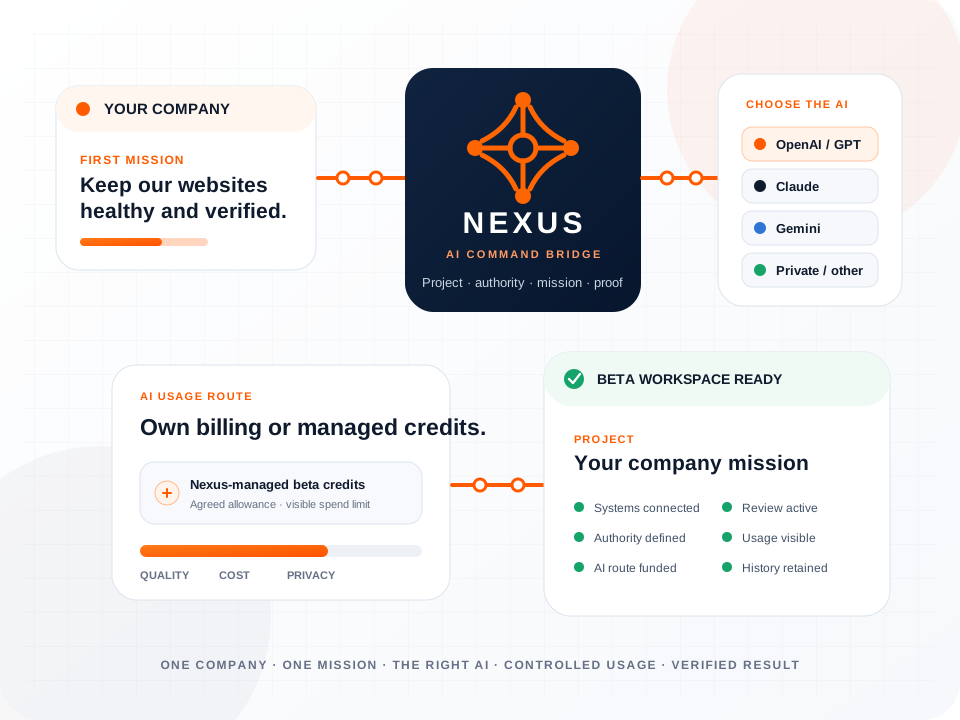
Nexus beta onboarding route connecting a company mission, AI providers, controlled credits and a verified result
MODEL-FLEXIBLE BY DESIGN

Choose the intelligence that fits the mission.

Nexus presents one coherent project and mission while different AI models can coordinate, research, build, review or supervise. The model can improve without changing the way your company gives instructions or controls authority.

Use your own provider account

Your company keeps the provider relationship, API billing and usage ownership. Nexus connects the authorised model route to the beta project.

I already use paid ChatGPT

Select the paid plan you use. Free ChatGPT is not used as a live mission route; Nexus establishes the separate API or managed-credit route required for execution.

Use Nexus-managed credits

Nexus prepares an account route with an agreed starting allowance, visible usage limit and model selection for the first mission.

Let Nexus recommend the setup

We match model quality, cost, privacy requirements and expected mission volume to a practical starting configuration.

Smarter models can produce better results.

Complex planning, coding, research and review benefit from stronger reasoning. Routine high-volume work can use more economical models. Nexus can assign each role deliberately instead of forcing one model to do everything.

BETA APPLICATION

Apply with “Keep a Portfolio of Websites Healthy” as your first mission.

Complete the four steps below. Do not send passwords or API keys; credentials are connected only after the application is accepted.

STEP 01

Tell us who you are and what your company does.

The beta is built around real company work. A clear business context helps us prepare the right project, permissions and first mission.

STEP 02

Choose the first mission you want to run.

Start with one outcome that matters. The strongest beta projects have a visible result, real operational volume and a clear point where human judgement remains.

SELECTED FROM MISSION CONTROLKeep a Portfolio of Websites Healthy

We will use this workflow as the starting pattern for your application.

Which working environments are involved?
STEP 03

Choose the AI and usage setup.

Nexus can work with different AI providers and can assign different models to planning, building, research, review and oversight. Higher-capability models generally improve difficult reasoning and implementation; economical models can handle routine volume.

Which AI system do you prefer?
How should AI usage be funded?

Do not enter API keys, passwords or login details in this application. Credentials are connected only after approval through the secure onboarding process.

STEP 04

Review the beta route and apply.

The application gives us enough information to evaluate a useful first mission, choose the AI usage route and prepare an active Nexus workspace.

COMPANYYour companyYour role
FIRST MISSIONKeep a Portfolio of Websites HealthyKeep our websites healthy. Repair routine problems that match our approved rules, re-check the result, and tell me only…
AI ROUTEAI setup
Step 1 of 4Your application is not sent until the final step.
WHAT HAPPENS NEXT

A beta application becomes an onboarding decision, not a mailing-list signup.

The Nexus team reviews whether the mission is concrete enough, which systems and AI route it needs, and how the first result can be verified.

01

Mission review

We check the objective, scope, systems, operational volume and human decision points.

02

AI and token plan

We agree the provider, model roles, ownership of billing and the initial usage ceiling.

03

Secure connection

Credentials and system access are added later through the controlled onboarding process—not through the public form.

04

Workspace activation

The beta project opens with its first mission, authority profile, connected systems and project history.